Terminator (by Chris Jones) is a very convenient command-line GUI middleware. That's because it excels on multiplexing a single GUI window for multiple GNOME terminals. One could try to achieve similar results by simply running GNU screen with multiple (split terminal) regions within a single GNOME terminal but in the end it can't keep up with all the features of a specialized GUI software as Terminator. The main focus of GNU screen is not the GUI thing, but the underlying shell process thing.
Under Solaris 11.3, Terminator is dependent on Python 2 and GTK+ 2:
Showing posts with label GUI. Show all posts
Showing posts with label GUI. Show all posts
Saturday, May 12, 2018
The command-line GUI
To achieve an efficient and functional UNIX command-line interface should be easy, but that's not always the case, because of the myriad of options and personal tastes, needless to say the many specific scenarios with unique requirements that may come into play.
On the seek for the "perfect terminal" I actually like to combine three things:
On the seek for the "perfect terminal" I actually like to combine three things:
- GNOME terminals
The fundamental underlying GUI terminal.
- Terminator
The fundamental GUI window multiplexer.
- GNU screen
The fundamental underlying shell process preserver.

Saturday, November 18, 2017
The Firefox issue
The Firefox versions that were shipped on Solaris 11 Express (even across all of its SRUs) and Solris 11.3 GA (and probably across all of its SRUs as well) are, saddly, rather outdated (for Solaris 11 Express that's even worse). For Solaris 11.3 the version is 31.8.0:


Multiple X displays
I once talked about Compiz Fusion which led me to a little X11 issue related to X11 screen composition settings and extensions. By that time I had just one monitor connected to my nVIDIA GT 610 video card:
$ xrandr
Screen 0: minimum 8 x 8, current 1680 x 1050, ...
DVI-I-0 disconnected primary (...)
VGA-0 disconnected (...)
DVI-I-1 connected 1680x1050+0+0 (...)
...
HDMI-0 disconnected (...)
...
Since then I've revived another old monitor, a 19" (TFT) Samsung SyncMaster 950B, that could be physically rotated, which I thought it would be useful as a secondary monitor for easing long readings, helping in more lengthy writings or codings and so on.
$ xrandr
Screen 0: minimum 8 x 8, current 1680 x 1050, ...
DVI-I-0 disconnected primary (...)
VGA-0 disconnected (...)
DVI-I-1 connected 1680x1050+0+0 (...)
...
HDMI-0 disconnected (...)
...
Since then I've revived another old monitor, a 19" (TFT) Samsung SyncMaster 950B, that could be physically rotated, which I thought it would be useful as a secondary monitor for easing long readings, helping in more lengthy writings or codings and so on.
Monday, July 31, 2017
Building Harbour
Almost unbelievable!
Let's build the "(xBASE) Clipper" compiler for Solaris 11.3!
But let me do a correction ;-), let's build the Harbour or simply HB for short.
Yes, Harbour seems to be one of the finest next-step Clipper substitutes.
If you know nothing about xBASE language, get to know it.
NOTE
Isn't that a dead or outdated development option from the 80s?
We're living on the 21st century! Why care about something 35 years old?
Nowadays I would say that the main favorable argument is SIMPLICITY.
But not only that. It's PRACTICAL, EFFICIENT and RESOURCEFUL.
As anything else, it's not a perfect and universal solution.
But it excels in its niche and it's easy to learn and use.
The possibilities it still offers outweighs its age.
And it now runs natively under Solaris 11.3!
Check the About Harbour web page.
NOTE

NOTE
NOTE
For learning how to build, one would certainly try to start from the web-page README or from the (roughly equivalent) ./READ.md file (by the way, .MD are MarkDown files frequently used with GitHub, but I don't care). In fact, there's not much there for a Solaris build, except for a few confirmations that minimum requirements are fulfilled, there's a bunch of environment variables to drive the build and installation and that you should use gmake or gmake install. But be aware that there are a few pitfalls; it's not that straightforward with respect to a Solaris build environment. I would say that the main value of this post is precisely the attempt to guide the whole build process in a more hassle-free approach.
Beyond GCC, other pre-requisites are (at least):
To get started, going manually or by customizing a script such as the one demonstrated at GNU - Build preparation post, create the underlying ZFS support using the same approach previously described in other "Building-series" posts of mine, for instance: Building Qt 4.8.7. In the end, it will become something similar to:
$ DS=.../software/hb
$ zfs list -o name -t all -r $DS |sed 's,$DS,...,'
NAME
...
.../hb-3.2.0
.../hb-3.2.0@source
.../hb-3.2.0-gnu32
.../hb-3.2.0-gnu32@start
.../hb-3.2.0-gnu32@build
.../hb-3.2.0-gnu64
.../hb-3.2.0-gnu64@start
.../hb-3.2.0-gnu64@build
The -gnuXX datasets are clones from @source. The @start snapshot is particularly important as an eventual reset point. Before creating it some manual fixes (hacks) to the extracted source-code tarball must be applied. There's no @config snapshots due to the building process differences from the standard GNU - Build Automation. Here, the @build snapshot is more than ever of just good-practice style.
The final resting place (and state) of the built modules will be similar to:
(pre-created as well, but as root, due to the /opt mountpoint)
$ DS=.../hb-3.2.0
$ zfs list -o name,mountpoint -t all -r $DS
NAME MOUNTPOINT
.../hb-3.2.0 /opt/hb-3.2.0
.../hb-3.2.0/gnu32 /opt/hb-3.2.0/gnu32
.../hb-3.2.0/gnu32@release
.../hb-3.2.0/gnu64 /opt/hb-3.2.0/gnu64
.../hb-3.2.0/gnu64@release
Now, I'll refer to a source-script (setenv) such as the one demonstrated at GNU - Build preparation post, with the following additions / customizations (located at ~/software/hb):
...
#
# Other PATH and PKG_CONFIG_PATH settings.
# Put entries in reverse order of dependency.
# (following my PATH building suggestion)
#
extend-env /opt/qt-4.8.7
extend-env /opt/sqlite-3.19.3
extend-env /opt/tcl-8.5.19
extend-env /opt/automake-1.15
extend-env /opt/autoconf-2.69
extend-env /opt/m4-1.4.18
extend-env /opt/libtool-2.4.6
...
#
# To be appended to the end of the setenv source-script
#
export HB_INSTALL_PREFIX=/opt/hb-3.2.0/gnu$BITS
export HB_COMPILER=gcc
export HB_USER_CFLAGS="$CFLAGS -R$HB_INSTALL_PREFIX/lib"
export HB_USER_DFLAGS="$HB_USER_CFLAGS"
export HB_USER_LDFLAGS="$HB_USER_CFLAGS"
export HB_BUILD_DYN=yes
export HB_INSTALL_DYN=yes
export HB_BUILD_CONTRIB=yes
export HB_BUILD_CONTRIB_DYN=yes
export HB_INSTALL_MAN=""
export HB_WITH_ODBC=/usr/include/odbc
export HB_WITH_SQLITE3=/opt/sqlite-3.19.3/gnu$BITS/include
export HB_WITH_GD=/usr/include/gd2
export HB_WITH_BZIP2=/usr/include
export HB_WITH_QT=/opt/qt-4.8.7/gnu$BITS/include
export HB_QTPATH=/opt/qt-4.8.7/gnu$BITS/bin
Now proceed to the fixes (hacks) to cope with GCC 4.8.2 and Solaris 11.3:
1) The layout of the HB_INSTALL_PREFIX tree is suboptimal. There are hard-coded subdirectories named harbour which can be inconvenient. I won't fix it, but I'll circumvent them as to my preference as follows:
$ cd ~/software/hb/hb-3.2.0-gnu32
$ diff /tmp/original-global.mk ./config/global.mk
492a493,505
> ifeq ($(HB_HOST_PLAT),sunos)
> ifneq ($(findstring amd64,$(shell isainfo -k)),)
> HB_HOST_CPU := x86_64
> ifneq ($(filter $(HB_USER_CFLAGS),-m64),)
> HB_CPU := x86_64
> else
> ifneq ($(filter $(HB_USER_CFLAGS),-m32),)
> HB_CPU := x86
> endif
> endif
> endif
> endif
>
1820c1833
< ifeq ($(HB_SYSLOC),yes)
---
> # ifeq ($(HB_SYSLOC),yes)
1822c1835
< endif
---
> # endif
1852,1853c1865,1866
< LIBPOSTFIX := $(LIBPOSTFIX)$(DIRSEP)harbour
< INCPOSTFIX := $(DIRSEP)harbour
---
> LIBPOSTFIX :=
> INCPOSTFIX :=
1889c1902
< export HB_INSTALL_DOC :=
$(HB_INSTALL_PREFIX)$(DIRSEP)share$(DIRSEP)doc$(DIRSEP)harbour
---
> export HB_INSTALL_DOC :=
$(HB_INSTALL_PREFIX)$(DIRSEP)share$(DIRSEP)doc
1896c1909
< ifeq ($(HB_SYSLOC),yes)
---
> # ifeq ($(HB_SYSLOC),yes)
1898c1911
< endif
---
> # endif
1908c1921
< export HB_INSTALL_ETC :=
$(HB_INSTALL_PREFIX)$(DIRSEP)etc$(DIRSEP)harbour
---
> export HB_INSTALL_ETC :=
$(HB_INSTALL_PREFIX)$(DIRSEP)etc
1916c1929
< ifneq ($(findstring |/opt/harbour,|$(HB_INSTALL_PREFIX)),)
---
> # ifneq ($(findstring |/opt/harbour,|$(HB_INSTALL_PREFIX)),)
1918,1920c1931,1933
< else
< export HB_INSTALL_CONTRIB :=
$(HB_INSTALL_PREFIX)$(DIRSEP)share$(DIRSEP)harbour$(DIRSEP)contrib
< endif
---
> # else
> # export HB_INSTALL_CONTRIB :=
$(HB_INSTALL_PREFIX)$(DIRSEP)share$(DIRSEP)harbour$(DIRSEP)contrib
> # endif
In case the above diff output gets difficult or somehow inconsistent, here's an attempt to present the above changes (hacks) in a different way:
2) In ./include/hbdefs.h,
after line 637, insert the following fix for the correct endianess detection:
NOTE
For fixing the hbmk2's default cpu setting (see the bottom of this post) I'll have to (approximately) adjust ./utils/hbmk2/hbmk2.prg as follows:
Take the @start snapshot:
$ zfs snapshot $DS/hb-3.2.0-gnu32@start
Now proceed to the "main build":
$ source ../setenv 32
...
$ gmake
...
And proceed to the "flawed" installation:
NOTE
# gmake install
...
# ^D
On both previous steps there will be a few unexpected errors:
For now, I gave up trying to understand the Harbour "make system".
I'll consider it some sort of bug, because AFAIK I could manually fix it.
As root make sure you place the all dynamic libraries in the right location (the lib subdir of the HB_INSTALL_PREFIX). AFAIK I couldn't get it working just via the environment variables!
$ env |grep HB
HB_BUILD_CONTRIB_DYN=yes
HB_WITH_SQLITE3=/opt/sqlite-3.19.3/gnu32/include
HB_WITH_GD=/usr/include/gd2
HB_BUILD_CONTRIB=yes
HB_USER_CFLAGS=-m32 -march=core2 -std=gnu89
HB_WITH_ODBC=/usr/include/odbc
HB_INSTALL_DYN=yes
HB_BUILD_DYN=yes
HB_WITH_QT=/opt/qt-4.8.7/gnu32/include
HB_INSTALL_PREFIX=/opt/hb-3.2.0/gnu32
HB_COMPILER=gcc
HB_INSTALL_MAN=
HB_QTPATH=/opt/qt-4.8.7/gnu32/bin
$ export HB=$(pwd)
$ su
# cd $HB_INSTALL_PREFIX/lib
# (cd $HB/lib/sunos/gcc; gtar cf /tmp/libs1.tar *.so*)
# gtar xf /tmp/libs1.tar
# (cd $HB/bin/sunos/gcc; gtar cf /tmp/libs2.tar *.so*)
# gtar xf /tmp/libs2.tar
# ^D
NOTE
$ export PATH=$HB_INSTALL_PREFIX/bin:$PATH
$ echo $PATH
/opt/hb-3.2.0/gnu32/bin:/opt/libtool-2.4.6/gnu32/bin:/opt/m4-1.4.18/gnu32/bin:/opt/autoconf-2.69/gnu32/bin:/opt/automake-1.15/gnu32/bin:/opt/tcl-8.5.19/gnu32/bin:/opt/sqlite-3.19.3/gnu32/bin:/opt/qt-4.8.7/gnu32/bin:/usr/gnu/bin:/usr/bin:/usr/sbin
$ cd $HB/contrib
$ INCLUDE_FIX="$(pwd)/rddsql"
$ ../bin/sunos/gcc/hbmk2 -cflag=-I"$INCLUDE_FIX" \
-width=0 -autohbm- @hbpre -inc -hbdyn \
sddsqlt3/sddsqlt3.hbp @hbpost sddsqlt3/sddsqlt3.hbc
hbmk2: Processing environment options: -comp=gcc
hbmk2: Dependency 'sqlite3' found: /opt/sqlite-3.19.3/gnu32/include (3.19.3)
hbmk2: Compiling...
hbmk2: Creating dynamic library... ../bin/sunos/gcc/libsddsqlt3.so.3.2.0
hbmk2: Created symbolic link ../bin/sunos/gcc/libsddsqlt3.so to libsddsqlt3.so.3.2.0
hbmk2: Created symbolic link ../bin/sunos/gcc/libsddsqlt3.so.3.2 to libsddsqlt3.so.3.2.0
$ ../bin/sunos/gcc/hbmk2 -cflag=-I"$INCLUDE_FIX" \
-width=0 -autohbm- @hbpre -inc -hbdyn \
sddodbc/sddodbc.hbp @hbpost sddodbc/sddodbc.hbc
hbmk2: Processing environment options: -comp=gcc
hbmk2: Dependency 'odbc' found: /usr/include/odbc
hbmk2: Compiling...
hbmk2: Creating dynamic library... ../bin/sunos/gcc/libsddodbc.so.3.2.0
hbmk2: Created symbolic link ../bin/sunos/gcc/libsddodbc.so to libsddodbc.so.3.2.0
hbmk2: Created symbolic link ../bin/sunos/gcc/libsddodbc.so.3.2 to libsddodbc.so.3.2.0
$ ../bin/sunos/gcc/hbmk2 \
-width=0 -autohbm- @hbpre -inc -hbdyn \
hbziparc/hbziparc.hbp @hbpost hbziparc/hbziparc.hbc
hbmk2: Processing environment options: -comp=gcc
hbmk2: Compiling Harbour sources...
hbmk2: Compiling...
hbmk2: Creating dynamic library... ../bin/sunos/gcc/libhbziparc.so.3.2.0
hbmk2: Created symbolic link ../bin/sunos/gcc/libhbziparc.so to libhbziparc.so.3.2.0
hbmk2: Created symbolic link ../bin/sunos/gcc/libhbziparc.so.3.2 to libhbziparc.so.3.2.0
$ ../bin/sunos/gcc/hbmk2 \
-width=0 -autohbm- @hbpre -inc -hbdyn \
hbgd/hbgd.hbp @hbpost hbgd/hbgd.hbc
hbmk2: Processing environment options: -comp=gcc
hbmk2: Dependency 'gd' found: /usr/include/gd2
hbmk2: Compiling Harbour sources...
hbmk2: Compiling...
hbmk2: Creating dynamic library... ../bin/sunos/gcc/libhbgd.so.3.2.0
hbmk2: Created symbolic link ../bin/sunos/gcc/libhbgd.so to libhbgd.so.3.2.0
hbmk2: Created symbolic link ../bin/sunos/gcc/libhbgd.so.3.2 to libhbgd.so.3.2.0
Maybe (double-check the build logs) it can be necessary to:
$ export HB_WITH_BZIP2=/usr/include
$ ../bin/sunos/gcc/hbmk2 \
-width=0 -autohbm- @hbpre -inc hbbz2/hbbz2.hbp @hbpost
hbmk2: Processing environment options: -comp=gcc
hbmk2: Dependency 'bzip2' found: /usr/include
hbmk2: Compiling...
hbmk2: Creating static library... ../lib/sunos/gcc/libhbbz2.a
$ ../bin/sunos/gcc/hbmk2 \
-width=0 -autohbm- @hbpre -inc -hbdyn hbbz2/hbbz2.hbp @hbpost hbbz2/hbbz2.hbc
hbmk2: Processing environment options: -comp=gcc
hbmk2: Dependency 'bzip2' found: /usr/include
hbmk2: Compiling...
hbmk2: Creating dynamic library... ../bin/sunos/gcc/libhbbz2.so.3.2.0
hbmk2: Created symbolic link ../bin/sunos/gcc/libhbbz2.so to libhbbz2.so.3.2.0
hbmk2: Created symbolic link ../bin/sunos/gcc/libhbbz2.so.3.2 to libhbbz2.so.3.2.0
NOTE
$ zfs snapshot $DS/hb-3.2.0-gnu32@build
Repeat the manual library copying step to ensure that the manually build libraries also get copied to $HB_INSTALL_PREFIX/lib.
$ cd $HB
$ su
# cd $HB_INSTALL_PREFIX/lib
# (cd $HB/lib/sunos/gcc; gtar cf /tmp/libs1.tar *.so*)
# gtar xf /tmp/libs1.tar
# (cd $HB/bin/sunos/gcc; gtar cf /tmp/libs2.tar *.so*)
# gtar xf /tmp/libs2.tar
And in addition, fix a few more things:
# cd ..
# rm bin/*.so*
# cat contrib/hbexpat/hbexpat.hbc
...
# libs=3rd/expat/expat.hbc ⭅ comment this line!
# mv bin/hbrun{,-bin}
# touch bin/hbrun
# chmod a+x bin/hbrun
# vim bin/hbrun
# cat bin/hbrun
#!/bin/bash
HB=/opt/hb-3.2.0/gnu32
LD_LIBRARY_PATH=$HB/lib $HB/bin/hbrun-bin $*
NOTE
# zfs snapshot .../hb-3.2.0/gnu32@release
At last, HB_INSTALL_PREFIX will look as follows:
# tree -d -L 2 $HB_INSTALL_PREFX
Of particularly interest are the libraries:
(some just static, some both static and dynamic)
# ls -lho $HB_INSTALL_PREFIX/lib |grep harbour
lrwxrwxrwx ... lib/libharbour.so -> libharbour.so.3.2.0
lrwxrwxrwx ... lib/libharbour.so.3.2 -> libharbour.so.3.2.0
-rwxr-xr-x ... lib/libharbour.so.3.2.0
and in general:
# ls -lho $HB_INSTALL_PREFIX/lib |egrep "lib.*\.(a|so)*"
-rw-r--r-- ... lib/lib___.a
lrwxrwxrwx ... lib/lib___.so -> lib___.so.3.2.0
lrwxrwxrwx ... lib/lib___.so.3.2 -> lib___.so.3.2.0
-rwxr-xr-x ... lib/lib___.so.3.2.0
...
And to the best of my understanding that's the essential start-up!
Welcome to xBASE under Solaris 11.3!
# $HB_INSTALL_PREFIX/bin/hbtest
Harbour Regression Test Suite
Copyright (c) 1999-2016, Viktor Szakats
http://harbour-project.org/
------------------------------------------------------------
Version: Harbour 3.2.0dev (r1705200225)
Compiler: GNU C 4.8.2 (32-bit)
OS: SunOS 5.11 i86pc
Date, Time: 2017-07-31 22:32:02
Shortcut opt.: On
Switches:
============================================================
R No. Line TestCall() -> Result | Expected
------------------------------------------------------------
============================================================
Test calls passed: 4861 ( 100.00 % )
Test calls failed: 0 ( 0.00 % )
----------
Total: 4861 ( Time elapsed: 0.19 seconds )
# $HB_INSTALL_PREFIX/bin/hbmk2 -build
Harbour 3.2.0dev (r1705200225)
Copyright (c) 1999-2016, http://harbour-project.org/
Harbour Build Info
---------------------------
Version: Harbour 3.2.0dev (r1705200225)
Compiler: GNU C 4.8.2 (32-bit)
Platform: SunOS 5.11 i86pc
PCode version: 0.3
ChangeLog last entry: 2017-05-20 02:25 UTC Viktor Szakats ...
ChangeLog ID: 731297e3d5b89d9f4304719560cd95f87ba1e239
Built on: Jul 30 2017 18:05:56
Extra C compiler options:
-m32 -march=core2 -std=gnu89 -R/opt/hb-3.2.0/gnu32/lib
Extra linker options:
-m32 -march=core2 -std=gnu89 -R/opt/hb-3.2.0/gnu32/lib
Build options: (Clipper 5.3b) (Clipper 5.x undoc)
---------------------------
At first I thought I had possible issues. But after further investigations the apparent inconsistency of having a lib under lib in dynprefix was of no concern. See the following output:
# $HB_INSTALL_PREFIX/bin/hbmk2 --hbinfo
{
"platform":"sunos",
"compiler":"gcc",
"cpu":"x86",
"buildname":"",
"targetname":".adhoc.",
"targettype":"hbexe",
"dynprefix":"/opt/hb-3.2.0/gnu32/lib/lib",
"dynsuffix":"",
"inc":"no",
"hbctree":""
}
For dynprefix that's not an issue because although dynprefix clearly contains a path, it's not a path, but just a string prefix (including the initial "lib" of the file-name) of some full library located in $HB_INSTALL_PREFIX/lib/.
As a very first personal examples, check these out:
$ cd /tmp
$ cat sample.prg
PROCEDURE main
SET CURSOR OFF
CLEAR SCREEN
msg_justify( MAXROW()/2, "Hello, world!" )
msg_justify( ROW()+1, "Press any key to exit!" )
INKEY(0)
CLEAR SCREEN
SET CURSOR ON
RETURN
FUNCTION msg_justify
PARAMETERS row, msg
@ row, ( MAXCOL() - LEN(msg) )/2 SAY msg
RETURN
$ $HB_INSTALL_PREFIX/bin/hbmk2 /tmp/sample.prg
Harbour 3.2.0dev (r1705200225)
Copyright (c) 1999-2016, http://harbour-project.org/
Compiling '/tmp/sample.prg'...
Lines 20, Functions/Procedures 2
Generating C source output to '/var/tmp/...'... Done.
$ ./sample
(did you notice the graphics mouse cursor under a $TERM=xterm ?)

You shall note however, if $TERM=sun-color (or some other value), then the some screen commands such as CLEAR SCREEN and SET CURSOR OFF won't work as expected if they'll work at all. Therefore, it's advisable to check for $TERM for determining in which runtime environment the program is and adjust screen behavior accordingly.
$ cat bitness.prg
PROCEDURE main
#ifdef __ARCH32BIT__
? "32"
#else
? "64"
#endif
RETURN
If using the 64-bit build you'll get:
$ $HB_INSTALL_PREFIX/bin/hbssr bitness.prg
64
Let's build the "(xBASE) Clipper" compiler for Solaris 11.3!
But let me do a correction ;-), let's build the Harbour or simply HB for short.
Yes, Harbour seems to be one of the finest next-step Clipper substitutes.
If you know nothing about xBASE language, get to know it.
NOTE
The xBASE language is originally and essentially procedural, not object-oriented. But the case for object-orientation is not a real impediment if modularity is well exploited. Originally, there's no SQL and the database is made of a bunch of data-files (.DBF) and index-files, which can be shared over the network with adequate file and record locking support. Essentially, databases are file-record based. The language is reasonably flexible and there's a nice support for (kind of forms-based and menu-driven) console applications (sometimes even with mouse support). Roughly, one could say it's more powerful (more modern and much easier) than COBOL, sufficiently low-level as COBOL can't ever be and much more resourceful on the UI aspect (although it could be purely BATCH). Well, and much, much more.Why Harbour, one could reasonably ask?
Isn't that a dead or outdated development option from the 80s?
We're living on the 21st century! Why care about something 35 years old?
Nowadays I would say that the main favorable argument is SIMPLICITY.
But not only that. It's PRACTICAL, EFFICIENT and RESOURCEFUL.
As anything else, it's not a perfect and universal solution.
But it excels in its niche and it's easy to learn and use.
The possibilities it still offers outweighs its age.
And it now runs natively under Solaris 11.3!
Check the About Harbour web page.
NOTE
I would risk to say that one interesting deployment of xBASE with Harbour would be for on-line or batch networked console applications modules running on "text-only" (minimal non-GUI systems such as Solaris 11 text-installs) boxes for supporting industrial plants IT infrastructure on tough environments.The Harbour Project has been trying to bring in many enhancements, as well as many new features, such as GUI support with Qt integration, some object orientation support and more:

NOTE
It may be important to mention that most libraries have both options of being static or dynamic. So, the there's no concern about code bloats or exaggerated consumption of resources. Furthermore, it's not constrained by the inherent DOS limitations and idiosyncrasies (it's a new world, it's UNIX and it can be Solaris).But it's not necessarily a wonderful world right from the start. Although a remarkable work and effort, as being free and open-source, the Harbour Project naturally lacks some "minor' finishing works, specially in website and documentation update and maintenance, as well as to source-code level deployment and build support and documentation. Particularly related to Solaris, currently, there are a few issues that haave to be manually adjusted (hacked) at first. The source-code deployment doesn't use a standard GNU - Build Automation and this brings difficulties in getting to know something different. I confess I don't have enough time to get to know all the details of Harbour's particular build process, but I'd summarize it as a mix of GNU and some inter-wined xBASE coding. I may have missed some points on how to properly deal with it, but I suspect that these points are actually bugs or shortcomings that would have to be addressed in the future. These difficulties did not prevent me from successfully build and use the current version.
NOTE
By the way, currently, there may be some confusion about versions. The main page says that the latest stable is 3.0.0 but the link points to version 3.2.0dev (just look at ./include/hbver.h macros). But there's also a fork to version 3.4.0. Anyway, for now, I'll stick to the main page version, 3.2.0dev.As I said, the build process is "unusual" and the documentation and general detection support seems scarce or needing more work and improvement. Due to all that I'll start with just the 32-bits scenario. I'll develop this post so that in the end for targeting 64-bits it will be just a matter of substituting 32 with 64 or, if you prefer, substituting 64 for 32 where applicable :-D
For learning how to build, one would certainly try to start from the web-page README or from the (roughly equivalent) ./READ.md file (by the way, .MD are MarkDown files frequently used with GitHub, but I don't care). In fact, there's not much there for a Solaris build, except for a few confirmations that minimum requirements are fulfilled, there's a bunch of environment variables to drive the build and installation and that you should use gmake or gmake install. But be aware that there are a few pitfalls; it's not that straightforward with respect to a Solaris build environment. I would say that the main value of this post is precisely the attempt to guide the whole build process in a more hassle-free approach.
Beyond GCC, other pre-requisites are (at least):
- slang
- gd
- qt-4.8.7
- sqlite-3.19.3
To get started, going manually or by customizing a script such as the one demonstrated at GNU - Build preparation post, create the underlying ZFS support using the same approach previously described in other "Building-series" posts of mine, for instance: Building Qt 4.8.7. In the end, it will become something similar to:
$ DS=.../software/hb
$ zfs list -o name -t all -r $DS |sed 's,$DS,...,'
NAME
...
.../hb-3.2.0
.../hb-3.2.0@source
.../hb-3.2.0-gnu32
.../hb-3.2.0-gnu32@start
.../hb-3.2.0-gnu32@build
.../hb-3.2.0-gnu64
.../hb-3.2.0-gnu64@start
.../hb-3.2.0-gnu64@build
The -gnuXX datasets are clones from @source. The @start snapshot is particularly important as an eventual reset point. Before creating it some manual fixes (hacks) to the extracted source-code tarball must be applied. There's no @config snapshots due to the building process differences from the standard GNU - Build Automation. Here, the @build snapshot is more than ever of just good-practice style.
The final resting place (and state) of the built modules will be similar to:
(pre-created as well, but as root, due to the /opt mountpoint)
$ DS=.../hb-3.2.0
$ zfs list -o name,mountpoint -t all -r $DS
NAME MOUNTPOINT
.../hb-3.2.0 /opt/hb-3.2.0
.../hb-3.2.0/gnu32 /opt/hb-3.2.0/gnu32
.../hb-3.2.0/gnu32@release
.../hb-3.2.0/gnu64 /opt/hb-3.2.0/gnu64
.../hb-3.2.0/gnu64@release
Now, I'll refer to a source-script (setenv) such as the one demonstrated at GNU - Build preparation post, with the following additions / customizations (located at ~/software/hb):
...
#
# Other PATH and PKG_CONFIG_PATH settings.
# Put entries in reverse order of dependency.
# (following my PATH building suggestion)
#
extend-env /opt/qt-4.8.7
extend-env /opt/sqlite-3.19.3
extend-env /opt/tcl-8.5.19
extend-env /opt/automake-1.15
extend-env /opt/autoconf-2.69
extend-env /opt/m4-1.4.18
extend-env /opt/libtool-2.4.6
...
#
# To be appended to the end of the setenv source-script
#
export HB_INSTALL_PREFIX=/opt/hb-3.2.0/gnu$BITS
export HB_COMPILER=gcc
export HB_USER_CFLAGS="$CFLAGS -R$HB_INSTALL_PREFIX/lib"
export HB_USER_DFLAGS="$HB_USER_CFLAGS"
export HB_USER_LDFLAGS="$HB_USER_CFLAGS"
export HB_BUILD_DYN=yes
export HB_INSTALL_DYN=yes
export HB_BUILD_CONTRIB=yes
export HB_BUILD_CONTRIB_DYN=yes
export HB_INSTALL_MAN=""
export HB_WITH_ODBC=/usr/include/odbc
export HB_WITH_SQLITE3=/opt/sqlite-3.19.3/gnu$BITS/include
export HB_WITH_GD=/usr/include/gd2
export HB_WITH_BZIP2=/usr/include
export HB_WITH_QT=/opt/qt-4.8.7/gnu$BITS/include
export HB_QTPATH=/opt/qt-4.8.7/gnu$BITS/bin
Now proceed to the fixes (hacks) to cope with GCC 4.8.2 and Solaris 11.3:
1) The layout of the HB_INSTALL_PREFIX tree is suboptimal. There are hard-coded subdirectories named harbour which can be inconvenient. I won't fix it, but I'll circumvent them as to my preference as follows:
$ cd ~/software/hb/hb-3.2.0-gnu32
$ diff /tmp/original-global.mk ./config/global.mk
492a493,505
> ifeq ($(HB_HOST_PLAT),sunos)
> ifneq ($(findstring amd64,$(shell isainfo -k)),)
> HB_HOST_CPU := x86_64
> ifneq ($(filter $(HB_USER_CFLAGS),-m64),)
> HB_CPU := x86_64
> else
> ifneq ($(filter $(HB_USER_CFLAGS),-m32),)
> HB_CPU := x86
> endif
> endif
> endif
> endif
>
1820c1833
< ifeq ($(HB_SYSLOC),yes)
---
> # ifeq ($(HB_SYSLOC),yes)
1822c1835
< endif
---
> # endif
1852,1853c1865,1866
< LIBPOSTFIX := $(LIBPOSTFIX)$(DIRSEP)harbour
< INCPOSTFIX := $(DIRSEP)harbour
---
> LIBPOSTFIX :=
> INCPOSTFIX :=
1889c1902
< export HB_INSTALL_DOC :=
$(HB_INSTALL_PREFIX)$(DIRSEP)share$(DIRSEP)doc$(DIRSEP)harbour
---
> export HB_INSTALL_DOC :=
$(HB_INSTALL_PREFIX)$(DIRSEP)share$(DIRSEP)doc
1896c1909
< ifeq ($(HB_SYSLOC),yes)
---
> # ifeq ($(HB_SYSLOC),yes)
1898c1911
< endif
---
> # endif
1908c1921
< export HB_INSTALL_ETC :=
$(HB_INSTALL_PREFIX)$(DIRSEP)etc$(DIRSEP)harbour
---
> export HB_INSTALL_ETC :=
$(HB_INSTALL_PREFIX)$(DIRSEP)etc
1916c1929
< ifneq ($(findstring |/opt/harbour,|$(HB_INSTALL_PREFIX)),)
---
> # ifneq ($(findstring |/opt/harbour,|$(HB_INSTALL_PREFIX)),)
1918,1920c1931,1933
< else
< export HB_INSTALL_CONTRIB :=
$(HB_INSTALL_PREFIX)$(DIRSEP)share$(DIRSEP)harbour$(DIRSEP)contrib
< endif
---
> # else
> # export HB_INSTALL_CONTRIB :=
$(HB_INSTALL_PREFIX)$(DIRSEP)share$(DIRSEP)harbour$(DIRSEP)contrib
> # endif
In case the above diff output gets difficult or somehow inconsistent, here's an attempt to present the above changes (hacks) in a different way:
493 ifeq ($(HB_HOST_PLAT),sunos)
494 ifneq ($(findstring amd64,$(shell isainfo -k)),)
495 HB_HOST_CPU := x86_64
496 ifneq ($(filter $(HB_USER_CFLAGS),-m64),)
497 HB_CPU := x86_64
498 else
499 ifneq ($(filter $(HB_USER_CFLAGS),-m32),)
500 HB_CPU := x86
501 endif
502 endif
503 endif
504 endif
505
506 ifeq ($(HB_INIT_DONE),)
507 $(info ! HB_HOST_PLAT: ...
508 endif
1827 export HB_SYSLOC
1828
1829 ifneq ($(HB_INSTALL_PREFIX),)
1830
1831 ifeq ($(HB_BUILD_SHARED),)
1832 ifneq ($(HB_PLATFORM_UNIX),)
1833 # ifeq ($(HB_SYSLOC),yes)
1834 export HB_BUILD_SHARED := yes
1835 # endif
1836 endif
1837 endif
1863 else
1864 ifneq ($(findstring |/opt,|$(HB_INSTALL_PREFIX)),)
1865 LIBPOSTFIX :=
1866 INCPOSTFIX :=
1867 else
1868 LIBPOSTFIX :=
1869 endif
1870 endif
1871 endif
1872 endif
1897 # Standard name: DOCDIR
1898 ifeq ($(HB_INSTALL_DOC),)
1899 ifeq ($(HB_PLATFORM_UNIX),)
1900 export HB_INSTALL_DOC := ...
1901 else
1902 export HB_INSTALL_DOC :=
$(HB_INSTALL_PREFIX)$(DIRSEP)share$(DIRSEP)doc
1903 endif
1904 endif
1905 # Standard name: MANDIR
1906 ifeq ($(HB_INSTALL_MAN),)
1907 # Do not set man dir for non-*nix targets
1908 ifneq ($(HB_PLATFORM_UNIX),)
1909 # ifeq ($(HB_SYSLOC),yes)
1910 export HB_INSTALL_MAN :=
$(HB_INSTALL_PREFIX)$(DIRSEP)share$(DIRSEP)man
1911 # endif
1912 endif
1913 endif
1914 # Standard name: ETCDIR
1915 ifeq ($(HB_INSTALL_ETC),)
1916 # Do not set doc dir for non-*nix targets
1917 ifneq ($(HB_PLATFORM_UNIX),)
1918 ifeq ($(HB_PLATFORM),darwin)
1919 export HB_INSTALL_ETC := ...
1920 else
1921 export HB_INSTALL_ETC :=
$(HB_INSTALL_PREFIX)$(DIRSEP)etc
1922 endif
1923 endif
1924 endif
1925 ifeq ($(HB_INSTALL_CONTRIB),)
1926 ifeq ($(HB_PLATFORM_UNIX),)
1927 export HB_INSTALL_CONTRIB := $(HB_INSTALL_PREFIX)$(DIRSEP)contrib
1928 else
1929 # ifneq ($(findstring |/opt/harbour,|$(HB_INSTALL_PREFIX)),)
1930 export HB_INSTALL_CONTRIB :=
$(HB_INSTALL_PREFIX)$(DIRSEP)contrib
1931 # else
1932 # export HB_INSTALL_CONTRIB := ...
1933 # endif
1934 endif
1935 endif
494 ifneq ($(findstring amd64,$(shell isainfo -k)),)
495 HB_HOST_CPU := x86_64
496 ifneq ($(filter $(HB_USER_CFLAGS),-m64),)
497 HB_CPU := x86_64
498 else
499 ifneq ($(filter $(HB_USER_CFLAGS),-m32),)
500 HB_CPU := x86
501 endif
502 endif
503 endif
504 endif
505
506 ifeq ($(HB_INIT_DONE),)
507 $(info ! HB_HOST_PLAT: ...
508 endif
1827 export HB_SYSLOC
1828
1829 ifneq ($(HB_INSTALL_PREFIX),)
1830
1831 ifeq ($(HB_BUILD_SHARED),)
1832 ifneq ($(HB_PLATFORM_UNIX),)
1833 # ifeq ($(HB_SYSLOC),yes)
1834 export HB_BUILD_SHARED := yes
1835 # endif
1836 endif
1837 endif
1863 else
1864 ifneq ($(findstring |/opt,|$(HB_INSTALL_PREFIX)),)
1865 LIBPOSTFIX :=
1866 INCPOSTFIX :=
1867 else
1868 LIBPOSTFIX :=
1869 endif
1870 endif
1871 endif
1872 endif
1897 # Standard name: DOCDIR
1898 ifeq ($(HB_INSTALL_DOC),)
1899 ifeq ($(HB_PLATFORM_UNIX),)
1900 export HB_INSTALL_DOC := ...
1901 else
1902 export HB_INSTALL_DOC :=
$(HB_INSTALL_PREFIX)$(DIRSEP)share$(DIRSEP)doc
1903 endif
1904 endif
1905 # Standard name: MANDIR
1906 ifeq ($(HB_INSTALL_MAN),)
1907 # Do not set man dir for non-*nix targets
1908 ifneq ($(HB_PLATFORM_UNIX),)
1909 # ifeq ($(HB_SYSLOC),yes)
1910 export HB_INSTALL_MAN :=
$(HB_INSTALL_PREFIX)$(DIRSEP)share$(DIRSEP)man
1911 # endif
1912 endif
1913 endif
1914 # Standard name: ETCDIR
1915 ifeq ($(HB_INSTALL_ETC),)
1916 # Do not set doc dir for non-*nix targets
1917 ifneq ($(HB_PLATFORM_UNIX),)
1918 ifeq ($(HB_PLATFORM),darwin)
1919 export HB_INSTALL_ETC := ...
1920 else
1921 export HB_INSTALL_ETC :=
$(HB_INSTALL_PREFIX)$(DIRSEP)etc
1922 endif
1923 endif
1924 endif
1925 ifeq ($(HB_INSTALL_CONTRIB),)
1926 ifeq ($(HB_PLATFORM_UNIX),)
1927 export HB_INSTALL_CONTRIB := $(HB_INSTALL_PREFIX)$(DIRSEP)contrib
1928 else
1929 # ifneq ($(findstring |/opt/harbour,|$(HB_INSTALL_PREFIX)),)
1930 export HB_INSTALL_CONTRIB :=
$(HB_INSTALL_PREFIX)$(DIRSEP)contrib
1931 # else
1932 # export HB_INSTALL_CONTRIB := ...
1933 # endif
1934 endif
1935 endif
2) In ./include/hbdefs.h,
after line 637, insert the following fix for the correct endianess detection:
...
637 #define HB_DBLFL_PREC_FACTOR 1.0000000000000002;
638
639 #if defined(__BYTE_ORDER__)
640
641 #if defined(__ORDER_LITTLE_ENDIAN__)
642
643 #if __BYTE_ORDER__ == __ORDER_LITTLE_ENDIAN__
644 #define HB_LITTLE_ENDIAN
645 #endif
646
647 #elif defined(__ORDER_BIG_ENDIAN__)
648
649 #if __BYTE_ORDER__ == __ORDER_BIG_ENDIAN__
650 #define HB_BIG_ENDIAN
651 #endif
652
653 #elif defined(__ORDER_PDP_ENDIAN__ )
654
655 #if __BYTE_ORDER__ == __ORDER_PDP_ENDIAN__
656 #define HB_PDP_ENDIAN
657 #endif
658
659 #endif
660
661 #endif
662
...
637 #define HB_DBLFL_PREC_FACTOR 1.0000000000000002;
638
639 #if defined(__BYTE_ORDER__)
640
641 #if defined(__ORDER_LITTLE_ENDIAN__)
642
643 #if __BYTE_ORDER__ == __ORDER_LITTLE_ENDIAN__
644 #define HB_LITTLE_ENDIAN
645 #endif
646
647 #elif defined(__ORDER_BIG_ENDIAN__)
648
649 #if __BYTE_ORDER__ == __ORDER_BIG_ENDIAN__
650 #define HB_BIG_ENDIAN
651 #endif
652
653 #elif defined(__ORDER_PDP_ENDIAN__ )
654
655 #if __BYTE_ORDER__ == __ORDER_PDP_ENDIAN__
656 #define HB_PDP_ENDIAN
657 #endif
658
659 #endif
660
661 #endif
662
...
NOTE
How did I get to the above fix?
By noting the following GCC 4.8.2 preprocessor defines:
$ gcc -dM -E - < /dev/null |egrep '(ORDER|ENDIAN)'
#define __ORDER_LITTLE_ENDIAN__ 1234
#define __FLOAT_WORD_ORDER__ __ORDER_LITTLE_ENDIAN__
#define __ORDER_PDP_ENDIAN__ 3412
#define __ORDER_BIG_ENDIAN__ 4321
#define __BYTE_ORDER__ __ORDER_LITTLE_ENDIAN__
For fixing the hbmk2's default cpu setting (see the bottom of this post) I'll have to (approximately) adjust ./utils/hbmk2/hbmk2.prg as follows:
12955 CASE HBMK_ISCOMP( "gcc|icc|clang|sunpro|diab|pcc|tcc" )
12956 /* TOFIX: This is not necessarily correct, since these inherit the
12957 default CPU architecture from OS default, by and large,
12958 and targets can be overridden using user options. */
12959 #ifdef __ARCH64BIT__
12960 RETURN "x86_64"
12961 #else
12962 RETURN "x86"
12963 #endif
12956 /* TOFIX: This is not necessarily correct, since these inherit the
12957 default CPU architecture from OS default, by and large,
12958 and targets can be overridden using user options. */
12959 #ifdef __ARCH64BIT__
12960 RETURN "x86_64"
12961 #else
12962 RETURN "x86"
12963 #endif
Take the @start snapshot:
$ zfs snapshot $DS/hb-3.2.0-gnu32@start
Now proceed to the "main build":
$ source ../setenv 32
...
$ gmake
...
And proceed to the "flawed" installation:
NOTE
The following command is just "su", not "su -".$ su
This is important and a limitation of the Harbour "make system".
# gmake install
...
# ^D
On both previous steps there will be a few unexpected errors:
hbmk2[hbgd]: Exit code: 7: failed in final assembly (linker or library manager)And there will be other expected harmless "warnings":
hbmk2[hbziparc]: Exit code: 7: failed in final assembly (linker or library manager)
hbmk2[sddodbc]: Exit code: 7: failed in final assembly (linker or library manager)
hbmk2[sddsqlt3]: Exit code: 7: failed in final assembly (linker or library manager)
hbmk2[gtalleg]: Exit code: 10: dependency missing or disabled
hbmk2[hbfbird]: Exit code: 10: dependency missing or disabled
hbmk2[hbfimage]: Exit code: 10: dependency missing or disabled
hbmk2[hbmagic]: Exit code: 10: dependency missing or disabled
hbmk2[hbmysql]: Exit code: 10: dependency missing or disabled
hbmk2[hbpgsql]: Exit code: 10: dependency missing or disabled
hbmk2[sddfb]: Exit code: 10: dependency missing or disabled
hbmk2[sddmy]: Exit code: 10: dependency missing or disabled
hbmk2[sddoci]: Exit code: 10: dependency missing or disabled
hbmk2[sddpg]: Exit code: 10: dependency missing or disabled
hbmk2[gtwvg]: Exit code: 50: stop requestedNaturally, the priority is to address the unexpected errors.
hbmk2[hbblat]: Exit code: 50: stop requested
hbmk2[hbwin]: Exit code: 50: stop requested
hbmk2[libhpdf]: Exit code: 50: stop requested
hbmk2[lzf]: Exit code: 50: stop requested
hbmk2[minilzo]: Exit code: 50: stop requested
hbmk2[minizip]: Exit code: 50: stop requested
hbmk2[mxml]: Exit code: 50: stop requested
hbmk2[rddads]: Exit code: 50: stop requested
hbmk2[tinymt]: Exit code: 50: stop requested
hbmk2[xdiff]: Exit code: 50: stop requested
For now, I gave up trying to understand the Harbour "make system".
I'll consider it some sort of bug, because AFAIK I could manually fix it.
As root make sure you place the all dynamic libraries in the right location (the lib subdir of the HB_INSTALL_PREFIX). AFAIK I couldn't get it working just via the environment variables!
$ env |grep HB
HB_BUILD_CONTRIB_DYN=yes
HB_WITH_SQLITE3=/opt/sqlite-3.19.3/gnu32/include
HB_WITH_GD=/usr/include/gd2
HB_BUILD_CONTRIB=yes
HB_USER_CFLAGS=-m32 -march=core2 -std=gnu89
HB_WITH_ODBC=/usr/include/odbc
HB_INSTALL_DYN=yes
HB_BUILD_DYN=yes
HB_WITH_QT=/opt/qt-4.8.7/gnu32/include
HB_INSTALL_PREFIX=/opt/hb-3.2.0/gnu32
HB_COMPILER=gcc
HB_INSTALL_MAN=
HB_QTPATH=/opt/qt-4.8.7/gnu32/bin
$ export HB=$(pwd)
$ su
# cd $HB_INSTALL_PREFIX/lib
# (cd $HB/lib/sunos/gcc; gtar cf /tmp/libs1.tar *.so*)
# gtar xf /tmp/libs1.tar
# (cd $HB/bin/sunos/gcc; gtar cf /tmp/libs2.tar *.so*)
# gtar xf /tmp/libs2.tar
# ^D
NOTE
You could gather the previous privileged (#) commands on a script because they will have to be repeated later. For instance:
#!/bin/bashThen, manually build the libraries that have failed in the automatic build:
if [[ -z $HB_INSTALL_PREFIX ]]
then
echo HB_INSTALL_PREFIX not set!
exit 1
fi
if [[ -z $HB ]]
then
echo HB not set!
exit 1
fi
echo From $HB/bin and $HB/lib to $HB_INSTALL_PREFIX/lib
cd $HB_INSTALL_PREFIX/lib
(cd $HB/lib/sunos/gcc; gtar cf /tmp/libs1.tar *.so*)
gtar xf /tmp/libs1.tar
(cd $HB/bin/sunos/gcc; gtar cf /tmp/libs2.tar *.so*)
gtar xf /tmp/libs2.tar
rm /tmp/libs1.tar /tmp/libs2.tar
$ export PATH=$HB_INSTALL_PREFIX/bin:$PATH
$ echo $PATH
/opt/hb-3.2.0/gnu32/bin:/opt/libtool-2.4.6/gnu32/bin:/opt/m4-1.4.18/gnu32/bin:/opt/autoconf-2.69/gnu32/bin:/opt/automake-1.15/gnu32/bin:/opt/tcl-8.5.19/gnu32/bin:/opt/sqlite-3.19.3/gnu32/bin:/opt/qt-4.8.7/gnu32/bin:/usr/gnu/bin:/usr/bin:/usr/sbin
$ cd $HB/contrib
$ INCLUDE_FIX="$(pwd)/rddsql"
$ ../bin/sunos/gcc/hbmk2 -cflag=-I"$INCLUDE_FIX" \
-width=0 -autohbm- @hbpre -inc -hbdyn \
sddsqlt3/sddsqlt3.hbp @hbpost sddsqlt3/sddsqlt3.hbc
hbmk2: Processing environment options: -comp=gcc
hbmk2: Dependency 'sqlite3' found: /opt/sqlite-3.19.3/gnu32/include (3.19.3)
hbmk2: Compiling...
hbmk2: Creating dynamic library... ../bin/sunos/gcc/libsddsqlt3.so.3.2.0
hbmk2: Created symbolic link ../bin/sunos/gcc/libsddsqlt3.so to libsddsqlt3.so.3.2.0
hbmk2: Created symbolic link ../bin/sunos/gcc/libsddsqlt3.so.3.2 to libsddsqlt3.so.3.2.0
$ ../bin/sunos/gcc/hbmk2 -cflag=-I"$INCLUDE_FIX" \
-width=0 -autohbm- @hbpre -inc -hbdyn \
sddodbc/sddodbc.hbp @hbpost sddodbc/sddodbc.hbc
hbmk2: Processing environment options: -comp=gcc
hbmk2: Dependency 'odbc' found: /usr/include/odbc
hbmk2: Compiling...
hbmk2: Creating dynamic library... ../bin/sunos/gcc/libsddodbc.so.3.2.0
hbmk2: Created symbolic link ../bin/sunos/gcc/libsddodbc.so to libsddodbc.so.3.2.0
hbmk2: Created symbolic link ../bin/sunos/gcc/libsddodbc.so.3.2 to libsddodbc.so.3.2.0
$ ../bin/sunos/gcc/hbmk2 \
-width=0 -autohbm- @hbpre -inc -hbdyn \
hbziparc/hbziparc.hbp @hbpost hbziparc/hbziparc.hbc
hbmk2: Processing environment options: -comp=gcc
hbmk2: Compiling Harbour sources...
hbmk2: Compiling...
hbmk2: Creating dynamic library... ../bin/sunos/gcc/libhbziparc.so.3.2.0
hbmk2: Created symbolic link ../bin/sunos/gcc/libhbziparc.so to libhbziparc.so.3.2.0
hbmk2: Created symbolic link ../bin/sunos/gcc/libhbziparc.so.3.2 to libhbziparc.so.3.2.0
$ ../bin/sunos/gcc/hbmk2 \
-width=0 -autohbm- @hbpre -inc -hbdyn \
hbgd/hbgd.hbp @hbpost hbgd/hbgd.hbc
hbmk2: Processing environment options: -comp=gcc
hbmk2: Dependency 'gd' found: /usr/include/gd2
hbmk2: Compiling Harbour sources...
hbmk2: Compiling...
hbmk2: Creating dynamic library... ../bin/sunos/gcc/libhbgd.so.3.2.0
hbmk2: Created symbolic link ../bin/sunos/gcc/libhbgd.so to libhbgd.so.3.2.0
hbmk2: Created symbolic link ../bin/sunos/gcc/libhbgd.so.3.2 to libhbgd.so.3.2.0
Maybe (double-check the build logs) it can be necessary to:
$ export HB_WITH_BZIP2=/usr/include
$ ../bin/sunos/gcc/hbmk2 \
-width=0 -autohbm- @hbpre -inc hbbz2/hbbz2.hbp @hbpost
hbmk2: Processing environment options: -comp=gcc
hbmk2: Dependency 'bzip2' found: /usr/include
hbmk2: Compiling...
hbmk2: Creating static library... ../lib/sunos/gcc/libhbbz2.a
$ ../bin/sunos/gcc/hbmk2 \
-width=0 -autohbm- @hbpre -inc -hbdyn hbbz2/hbbz2.hbp @hbpost hbbz2/hbbz2.hbc
hbmk2: Processing environment options: -comp=gcc
hbmk2: Dependency 'bzip2' found: /usr/include
hbmk2: Compiling...
hbmk2: Creating dynamic library... ../bin/sunos/gcc/libhbbz2.so.3.2.0
hbmk2: Created symbolic link ../bin/sunos/gcc/libhbbz2.so to libhbbz2.so.3.2.0
hbmk2: Created symbolic link ../bin/sunos/gcc/libhbbz2.so.3.2 to libhbbz2.so.3.2.0
NOTE
Again, you could gather the previous commands on a script just for convenience or maybe multiple builds targets. For instance:
#!/bin/bashTake the @build snapshot:
if [[ -z $HB_INSTALL_PREFIX ]]
then
echo HB_INSTALL_PREFIX not set!
exit 1
fi
if [[ -z $HB ]]
then
echo HB not set!
exit 1
fi
echo
echo Fixing libraries from $HB/contrib
echo
export PATH=$HB_INSTALL_PREFIX/bin:$PATH
cd $HB/contrib
INCLUDE_FIX="$(pwd)/rddsql"
echo sddsqlt3
../bin/sunos/gcc/hbmk2 -cflag=-I"$INCLUDE_FIX" \
-width=0 -autohbm- @hbpre -inc -hbdyn \
sddsqlt3/sddsqlt3.hbp @hbpost sddsqlt3/sddsqlt3.hbc
echo
echo sddodbc
../bin/sunos/gcc/hbmk2 -cflag=-I"$INCLUDE_FIX" \
-width=0 -autohbm- @hbpre -inc -hbdyn \
sddodbc/sddodbc.hbp @hbpost sddodbc/sddodbc.hbc
echo
echo hbziparc
../bin/sunos/gcc/hbmk2 \
-width=0 -autohbm- @hbpre -inc -hbdyn \
hbziparc/hbziparc.hbp @hbpost hbziparc/hbziparc.hbc
echo
echo hbgd
../bin/sunos/gcc/hbmk2 \
-width=0 -autohbm- @hbpre -inc -hbdyn \
hbgd/hbgd.hbp @hbpost hbgd/hbgd.hbc
echo
echo hbbz2
../bin/sunos/gcc/hbmk2 \
-width=0 -autohbm- @hbpre -inc hbbz2/hbbz2.hbp @hbpost
../bin/sunos/gcc/hbmk2 \
-width=0 -autohbm- @hbpre -inc -hbdyn hbbz2/hbbz2.hbp @hbpost
$ zfs snapshot $DS/hb-3.2.0-gnu32@build
Repeat the manual library copying step to ensure that the manually build libraries also get copied to $HB_INSTALL_PREFIX/lib.
$ cd $HB
$ su
# cd $HB_INSTALL_PREFIX/lib
# (cd $HB/lib/sunos/gcc; gtar cf /tmp/libs1.tar *.so*)
# gtar xf /tmp/libs1.tar
# (cd $HB/bin/sunos/gcc; gtar cf /tmp/libs2.tar *.so*)
# gtar xf /tmp/libs2.tar
And in addition, fix a few more things:
# cd ..
# rm bin/*.so*
# cat contrib/hbexpat/hbexpat.hbc
...
# libs=3rd/expat/expat.hbc ⭅ comment this line!
# mv bin/hbrun{,-bin}
# touch bin/hbrun
# chmod a+x bin/hbrun
# vim bin/hbrun
# cat bin/hbrun
#!/bin/bash
HB=/opt/hb-3.2.0/gnu32
LD_LIBRARY_PATH=$HB/lib $HB/bin/hbrun-bin $*
NOTE
Once more you could gather commands on a script for added convenience, in this case, for the hbrun "invoke fix" via LD_LIBRARY_PATH (or you could take more time in trying to find out how to pass an -R option to the hbrun make step, how knows if at ./contrib/hbrun/hbrun.hbp). For instance:
#!/bin/bashTake the final snapshot:
if [[ -z $HB_INSTALL_PREFIX ]]
then
echo HB_INSTALL_PREFIX not set!
exit 1
fi
cd $HB_INSTALL_PREFIX
#
# Harbour Shell / Script Runner (hbssr)
#
cat >bin/hbssr <<EOF
#!/bin/bash
HB=$HB_INSTALL_PREFIX
LD_LIBRARY_PATH=\$HB/lib \$HB/bin/hbrun \$*
EOF
chmod a+x bin/hbssr
# zfs snapshot .../hb-3.2.0/gnu32@release
At last, HB_INSTALL_PREFIX will look as follows:
# tree -d -L 2 $HB_INSTALL_PREFX
/opt/hb-3.2.0/gnu3258 directories
├── bin
├── contrib
│ ├── gtqtc
│ ├── hbamf
│ ├── hbblink
│ ├── hbbz2
│ ├── hbbz2io
│ ├── hbcairo
│ ├── hbcomio
│ ├── hbcomm
│ ├── hbct
│ ├── hbcups
│ ├── hbcurl
│ ├── hbexpat
│ ├── hbformat
│ ├── hbfoxpro
│ ├── hbfship
│ ├── hbgd
│ ├── hbgs
│ ├── hbgt
│ ├── hbgzio
│ ├── hbhpdf
│ ├── hbhttpd
│ ├── hblzf
│ ├── hbmemio
│ ├── hbmisc
│ ├── hbmlzo
│ ├── hbmxml
│ ├── hbmzip
│ ├── hbnetio
│ ├── hbnf
│ ├── hbodbc
│ ├── hboslib
│ ├── hbpipeio
│ ├── hbsms
│ ├── hbsqlit3
│ ├── hbssl
│ ├── hbtcpio
│ ├── hbtest
│ ├── hbtinymt
│ ├── hbtip
│ ├── hbtpathy
│ ├── hbunix
│ ├── hbxdiff
│ ├── hbxpp
│ ├── hbzebra
│ ├── hbziparc
│ ├── rddbm
│ ├── rddsql
│ ├── sddodbc
│ ├── sddsqlt3
│ └── xhb
├── etc
├── include
├── lib
└── share
├── doc
└── man
Of particularly interest are the libraries:
(some just static, some both static and dynamic)
# ls -lho $HB_INSTALL_PREFIX/lib |grep harbour
lrwxrwxrwx ... lib/libharbour.so -> libharbour.so.3.2.0
lrwxrwxrwx ... lib/libharbour.so.3.2 -> libharbour.so.3.2.0
-rwxr-xr-x ... lib/libharbour.so.3.2.0
and in general:
# ls -lho $HB_INSTALL_PREFIX/lib |egrep "lib.*\.(a|so)*"
-rw-r--r-- ... lib/lib___.a
lrwxrwxrwx ... lib/lib___.so -> lib___.so.3.2.0
lrwxrwxrwx ... lib/lib___.so.3.2 -> lib___.so.3.2.0
-rwxr-xr-x ... lib/lib___.so.3.2.0
...
And to the best of my understanding that's the essential start-up!
Welcome to xBASE under Solaris 11.3!
# $HB_INSTALL_PREFIX/bin/hbtest
Harbour Regression Test Suite
Copyright (c) 1999-2016, Viktor Szakats
http://harbour-project.org/
------------------------------------------------------------
Version: Harbour 3.2.0dev (r1705200225)
Compiler: GNU C 4.8.2 (32-bit)
OS: SunOS 5.11 i86pc
Date, Time: 2017-07-31 22:32:02
Shortcut opt.: On
Switches:
============================================================
R No. Line TestCall() -> Result | Expected
------------------------------------------------------------
============================================================
Test calls passed: 4861 ( 100.00 % )
Test calls failed: 0 ( 0.00 % )
----------
Total: 4861 ( Time elapsed: 0.19 seconds )
# $HB_INSTALL_PREFIX/bin/hbmk2 -build
Harbour 3.2.0dev (r1705200225)
Copyright (c) 1999-2016, http://harbour-project.org/
Harbour Build Info
---------------------------
Version: Harbour 3.2.0dev (r1705200225)
Compiler: GNU C 4.8.2 (32-bit)
Platform: SunOS 5.11 i86pc
PCode version: 0.3
ChangeLog last entry: 2017-05-20 02:25 UTC Viktor Szakats ...
ChangeLog ID: 731297e3d5b89d9f4304719560cd95f87ba1e239
Built on: Jul 30 2017 18:05:56
Extra C compiler options:
-m32 -march=core2 -std=gnu89 -R/opt/hb-3.2.0/gnu32/lib
Extra linker options:
-m32 -march=core2 -std=gnu89 -R/opt/hb-3.2.0/gnu32/lib
Build options: (Clipper 5.3b) (Clipper 5.x undoc)
---------------------------
At first I thought I had possible issues. But after further investigations the apparent inconsistency of having a lib under lib in dynprefix was of no concern. See the following output:
# $HB_INSTALL_PREFIX/bin/hbmk2 --hbinfo
{
"platform":"sunos",
"compiler":"gcc",
"cpu":"x86",
"buildname":"",
"targetname":".adhoc.",
"targettype":"hbexe",
"dynprefix":"/opt/hb-3.2.0/gnu32/lib/lib",
"dynsuffix":"",
"inc":"no",
"hbctree":""
}
For dynprefix that's not an issue because although dynprefix clearly contains a path, it's not a path, but just a string prefix (including the initial "lib" of the file-name) of some full library located in $HB_INSTALL_PREFIX/lib/.
As a very first personal examples, check these out:
$ cd /tmp
$ cat sample.prg
PROCEDURE main
SET CURSOR OFF
CLEAR SCREEN
msg_justify( MAXROW()/2, "Hello, world!" )
msg_justify( ROW()+1, "Press any key to exit!" )
INKEY(0)
CLEAR SCREEN
SET CURSOR ON
RETURN
FUNCTION msg_justify
PARAMETERS row, msg
@ row, ( MAXCOL() - LEN(msg) )/2 SAY msg
RETURN
$ $HB_INSTALL_PREFIX/bin/hbmk2 /tmp/sample.prg
Harbour 3.2.0dev (r1705200225)
Copyright (c) 1999-2016, http://harbour-project.org/
Compiling '/tmp/sample.prg'...
Lines 20, Functions/Procedures 2
Generating C source output to '/var/tmp/...'... Done.
$ ./sample
(did you notice the graphics mouse cursor under a $TERM=xterm ?)
You shall note however, if $TERM=sun-color (or some other value), then the some screen commands such as CLEAR SCREEN and SET CURSOR OFF won't work as expected if they'll work at all. Therefore, it's advisable to check for $TERM for determining in which runtime environment the program is and adjust screen behavior accordingly.
$ cat bitness.prg
PROCEDURE main
#ifdef __ARCH32BIT__
? "32"
#else
? "64"
#endif
RETURN
If using the 64-bit build you'll get:
$ $HB_INSTALL_PREFIX/bin/hbssr bitness.prg
64
Thursday, July 6, 2017
Building Qt 4.8.7
Many already have probably heard about Qt by now so I will be terse in saying how cool it is and yet maybe too overwhelming, except for big and complex applications. What matters most in this post is how to using on a Solaris 11.3 (GA / Release) desktop. There are no pre-built binaries, except to some well known Solaris (honorable) sites which attempt to address the gaps in software availability to Solaris. The problem with those sites is that they somewhat lag behind or require to much stuff to setup their distribuition infrastructure. In face of that, I always prefer to build the software myself under a controlled environment I know better and is 100% free of security issues.
I will build it with GNU tools and compilers, targeting both 32 and 64 bits. The reason for not using Developer Studio at first is because software out there is more frequently distributed with the GNU build automation tools in mind so that the probability of a successful build is higher at first. Most of the GNU tools furnished with Solaris 11.3 (GA / Release) seems fairly updated, except for GNU build automation the themselves, which I recommend updating beforehand. Furthermore, the GCC packaged with Solaris is version 4.8.2, which means that it only fully supports C89 and C++03, so all bets are off for anything newer than that. Fortunately, this legacy version 4.8.7 of Qt don't require anything else than that. I know that C++03 is already history, but nevertheless it is there in case you need it. By the way, C is also history and yet it is still wildely prevalent in so many areas.
I learned the hard-way that the following Solaris 11.3 packages must be installed in order to maximize features and gracefully build Qt:
I thought that building Qt shouldn't be difficult (and in the end I confirm that) but that's not so unless you have all the necessary information at your fingertips, which, at least in case of Solaris, isn't that so. Despite the available information on its website the task wasn't easy at first and I had to pass to a series of trials and errors until I get there. As I believe noone should deserve that, as usual, I share my knowlege with the rest of the world on the belief that the contribution would make more people happier and think about doing the same more often.
In building Qt you'll have the ability to enable some features deemed as plugins but some of them must preexist installed on the Solaris system, either pre-packaged or manually built similarly to this task. Some of these features already package in Solaris will work with no issues, others won't because they are outdated or because of the way they were built and/or made available in the system. One example is SQLite version 3. The package available to Solaris is the 32-bits version 3.8.8.1 with certain features disabled or not available. For Qt that seems to be not much of a problem, but for Firefox it certainly is. Thus, as SQLite is so prevalent, this is a pre-requisite that's better to address right-away to avoid subsequent limitations or unexpected shortcomings, that is, update / install SQLite (by manually building both the 32 and 64 bits enabling all its features) right-away! The build work-flow is similar to the one on this post!
At the time of this writing, first, download the source-code tarball for version 4.8.7. You should look for the 230 Mb file named qt-everywhere-opensource-src-4.8.7.tar.gz (using git is not a good choice, as the Solaris version is outdated and in the end you'll only get more trouble, unless you have already taken care of manually updating it). Now follow my recommedation on GNU - Build preparation in order to prepare a sane environment for the task. Next to this previous step, fine-tune the generated setenv executable script in the root of the corresponding version subtree to consider an updated SQLite (as well as any other pre-requisite software) installation, for instance:
...
# Insert below, other PATH and PKG_CONFIG_PATH settings.
# Follow my PATH building suggestion.
PKG=/opt/sqlite-3.19.3/gnu$BITS
if [[ -d "$PKG" ]] ;
then
CFG=$PKG/bin
! [[ "$PATH" =~ "$PKG" ]] && \
export PATH=$CFG:$PATH
CFG=$PKG/lib/pkgconfig
PCP=${PKG_CONFIG_PATH:+:$PKG_CONFIG_PATH}
! [[ "$PCP" =~ "$PKG" ]] && \
export PKG_CONFIG_PATH=$CFG$PCP
fi
...
In fact, the above will be part of a more complete environment setup (the setenv script) which I reference on some of the previous links. The relevant ajustments to the script are:
#
# Other PATH and PKG_CONFIG_PATH settings.
# Put in reverse order of dependency.
#
extend-env /opt/sqlite-3.19.3
extend-env /opt/tcl-8.5.19
extend-env /opt/automake-1.15
extend-env /opt/autoconf-2.69
extend-env /opt/m4-1.4.18
extend-env /opt/libtool-2.4.6
From the ZFS perspective, the "sane" environment is:
$ DS=...
$ zfs list -o name -t all -r $DS/software/Qt |sed 's,$DS,...,'
NAME
.../software/Qt
.../software/Qt/qt-4.8.7
.../software/Qt/qt-4.8.7@source
.../software/Qt/qt-4.8.7-gnu32
.../software/Qt/qt-4.8.7-gnu32@start
.../software/Qt/qt-4.8.7-gnu32@config
.../software/Qt/qt-4.8.7-gnu32@build
.../software/Qt/qt-4.8.7-gnu64
.../software/Qt/qt-4.8.7-gnu64@start
.../software/Qt/qt-4.8.7-gnu64@config
.../software/Qt/qt-4.8.7-gnu64@build
The qt-4.8.7 is the ZFS dataset to where the tarball was extracted.
Right after extraction the @source ZFS snapshot is taken.
The qt-4.8.7 dataset is made readonly, hum..., just in case.
The qt-4.8.7-gnu32 and qt-4.8.7-gnu64 are ZFS clones of @source.
Before the @start snapshots, certain "adjustments" are required.
First, the files qmake.conf and qplatformdefs.h .
They are at mkspecs/build-type/ subdirectories of the clones' mountpoints.
You may note in mkspecs/ a symbolic link called default, but ignore it.
As I'm building for GNU, build-type will be solaris-g++ and solaris-g++64.
The adjustments are:
The adjustment is:
Now take the @start snapshots and configure each build-type.
NOTE
For GNU32:
For GNU64:
An initial licensing terms is presented:
(accept it by entering yes)
This is the Open Source Edition.
You are licensed to use this software under the terms of
the Lesser GNU General Public License (LGPL) versions 2.1.
You are also licensed to use this software under the terms of
the GNU General Public License (GPL) versions 3.
Type '3' to view the GNU General Public License version 3.
Type 'L' to view the Lesser GNU General Public License version 2.1.
Type 'yes' to accept this license offer.
Type 'no' to decline this license offer.
Do you accept the terms of either license?
Each build target will output with a corresponding header:
But both will continue their output as follows:
After a while (around 15 min on my slow machine) one sees:
(it's safe to completely ignore most of the configure instructions;
ZFS is an exceeding file-system dispensing reconfigure and confclean)
Now take the @config snapshots and build each build-type:
(this takes time on my slow machine; enough for a good nap, at least!)
$ gmake
Now take the @build snapshots and install each build-type:
(assuming that the right ZFS datasets were already mapped under /opt)
$ sudo gmake install
Now take the @release snapshots of each build-type installed.
The final results on the building machine are as follows:
$ DS=rpool/VARSHARE/qt-4.8.7
$ zfs list -o name -t all -r $DS
NAME
rpool/VARSHARE/qt-4.8.7
rpool/VARSHARE/qt-4.8.7/gnu32
rpool/VARSHARE/qt-4.8.7/gnu32@release
rpool/VARSHARE/qt-4.8.7/gnu64
rpool/VARSHARE/qt-4.8.7/gnu64@release
Now, if you plan to distribute the binaries, you have to package or create a tarball for each build-type. In general, if nothing more than the sub-structure under /opt is enough (which is the case), then the simplicity of a tarball is much more appealing.
Once the binaries are in place (integrated into /opt), it's just a matter of adjusting the PATH environment variable as usual:
$ export PATH=/opt/qt-4.8.7/gnu64/bin:$PATH
$ cd /opt/qt-4.8.7/gnu64/bin
$ ls -1
assistant
designer
lconvert
linguist
lrelease
lupdate
moc
pixeltool
qcollectiongenerator
qdbus
qdbuscpp2xml
qdbusviewer
qdbusxml2cpp
qdoc3
qhelpconverter
qhelpgenerator
qmake
qmlplugindump
qmlviewer
qt3to4
qtconfig
qtdemo
qttracereplay
rcc
uic
uic3
xmlpatterns
xmlpatternsvalidator
$ cd /opt/qt-4.8.7/gnu64/lib
$ ls -1 *.so.?.?.?
libphonon.so.4.4.0
libQt3Support.so.4.8.7
libQtCLucene.so.4.8.7
libQtCore.so.4.8.7
libQtDBus.so.4.8.7
libQtDeclarative.so.4.8.7
libQtDesigner.so.4.8.7
libQtDesignerComponents.so.4.8.7
libQtGui.so.4.8.7
libQtHelp.so.4.8.7
libQtMultimedia.so.4.8.7
libQtNetwork.so.4.8.7
libQtOpenGL.so.4.8.7
libQtScript.so.4.8.7
libQtScriptTools.so.4.8.7
libQtSql.so.4.8.7
libQtSvg.so.4.8.7
libQtTest.so.4.8.7
libQtXml.so.4.8.7
libQtXmlPatterns.so.4.8.7
You should make sure that the GUI Style is GTK+.
$ qtconfig

Et voilà!
$ qtdemo

NOTE
I will build it with GNU tools and compilers, targeting both 32 and 64 bits. The reason for not using Developer Studio at first is because software out there is more frequently distributed with the GNU build automation tools in mind so that the probability of a successful build is higher at first. Most of the GNU tools furnished with Solaris 11.3 (GA / Release) seems fairly updated, except for GNU build automation the themselves, which I recommend updating beforehand. Furthermore, the GCC packaged with Solaris is version 4.8.2, which means that it only fully supports C89 and C++03, so all bets are off for anything newer than that. Fortunately, this legacy version 4.8.7 of Qt don't require anything else than that. I know that C++03 is already history, but nevertheless it is there in case you need it. By the way, C is also history and yet it is still wildely prevalent in so many areas.
I learned the hard-way that the following Solaris 11.3 packages must be installed in order to maximize features and gracefully build Qt:
- unicode
- developer/icu
- library/icu
- image/graphviz
- x11/library/xtrans
I thought that building Qt shouldn't be difficult (and in the end I confirm that) but that's not so unless you have all the necessary information at your fingertips, which, at least in case of Solaris, isn't that so. Despite the available information on its website the task wasn't easy at first and I had to pass to a series of trials and errors until I get there. As I believe noone should deserve that, as usual, I share my knowlege with the rest of the world on the belief that the contribution would make more people happier and think about doing the same more often.
In building Qt you'll have the ability to enable some features deemed as plugins but some of them must preexist installed on the Solaris system, either pre-packaged or manually built similarly to this task. Some of these features already package in Solaris will work with no issues, others won't because they are outdated or because of the way they were built and/or made available in the system. One example is SQLite version 3. The package available to Solaris is the 32-bits version 3.8.8.1 with certain features disabled or not available. For Qt that seems to be not much of a problem, but for Firefox it certainly is. Thus, as SQLite is so prevalent, this is a pre-requisite that's better to address right-away to avoid subsequent limitations or unexpected shortcomings, that is, update / install SQLite (by manually building both the 32 and 64 bits enabling all its features) right-away! The build work-flow is similar to the one on this post!
At the time of this writing, first, download the source-code tarball for version 4.8.7. You should look for the 230 Mb file named qt-everywhere-opensource-src-4.8.7.tar.gz (using git is not a good choice, as the Solaris version is outdated and in the end you'll only get more trouble, unless you have already taken care of manually updating it). Now follow my recommedation on GNU - Build preparation in order to prepare a sane environment for the task. Next to this previous step, fine-tune the generated setenv executable script in the root of the corresponding version subtree to consider an updated SQLite (as well as any other pre-requisite software) installation, for instance:
...
# Insert below, other PATH and PKG_CONFIG_PATH settings.
# Follow my PATH building suggestion.
PKG=/opt/sqlite-3.19.3/gnu$BITS
if [[ -d "$PKG" ]] ;
then
CFG=$PKG/bin
! [[ "$PATH" =~ "$PKG" ]] && \
export PATH=$CFG:$PATH
CFG=$PKG/lib/pkgconfig
PCP=${PKG_CONFIG_PATH:+:$PKG_CONFIG_PATH}
! [[ "$PCP" =~ "$PKG" ]] && \
export PKG_CONFIG_PATH=$CFG$PCP
fi
...
In fact, the above will be part of a more complete environment setup (the setenv script) which I reference on some of the previous links. The relevant ajustments to the script are:
#
# Other PATH and PKG_CONFIG_PATH settings.
# Put in reverse order of dependency.
#
extend-env /opt/sqlite-3.19.3
extend-env /opt/tcl-8.5.19
extend-env /opt/automake-1.15
extend-env /opt/autoconf-2.69
extend-env /opt/m4-1.4.18
extend-env /opt/libtool-2.4.6
From the ZFS perspective, the "sane" environment is:
$ DS=...
$ zfs list -o name -t all -r $DS/software/Qt |sed 's,$DS,...,'
NAME
.../software/Qt
.../software/Qt/qt-4.8.7
.../software/Qt/qt-4.8.7@source
.../software/Qt/qt-4.8.7-gnu32
.../software/Qt/qt-4.8.7-gnu32@start
.../software/Qt/qt-4.8.7-gnu32@config
.../software/Qt/qt-4.8.7-gnu32@build
.../software/Qt/qt-4.8.7-gnu64
.../software/Qt/qt-4.8.7-gnu64@start
.../software/Qt/qt-4.8.7-gnu64@config
.../software/Qt/qt-4.8.7-gnu64@build
The qt-4.8.7 is the ZFS dataset to where the tarball was extracted.
Right after extraction the @source ZFS snapshot is taken.
The qt-4.8.7 dataset is made readonly, hum..., just in case.
The qt-4.8.7-gnu32 and qt-4.8.7-gnu64 are ZFS clones of @source.
Before the @start snapshots, certain "adjustments" are required.
First, the files qmake.conf and qplatformdefs.h .
They are at mkspecs/build-type/ subdirectories of the clones' mountpoints.
You may note in mkspecs/ a symbolic link called default, but ignore it.
As I'm building for GNU, build-type will be solaris-g++ and solaris-g++64.
The adjustments are:
In .../qt-4.8.7-gnu32/mkspecs/solaris-g++/qmake.conf:Second, config.tests/x11/xinput/xinput.cpp.
(core2 is a particular optimization, not a requirement)
22: QMAKE_CFLAGS = -march=core2 -std=gnu89
34: QMAKE_CXXFLAGS = -march=core2 -std=gnu++03
45: QMAKE_INCDIR = /usr/include
46: QMAKE_LIBDIR = /usr/lib
In .../qt-4.8.7-gnu32/mkspecs/solaris-g++/qplatformdefs.h:
124: // typedef unsigned int useconds_t;
125: // extern "C" int usleep(useconds_t);
126: // extern "C" int gethostname(char *, int);
In .../qt-4.8.7-gnu64/mkspecs/solaris-g++-64/qmake.conf:
QMAKE_CFLAGS = -m64 -march=core2 -std=gnu89 ...keep rest...
QMAKE_CXXFLAGS = -m64 -march=core2 -std=gnu++03 ...keep rest...
QMAKE_INCDIR = /usr/include
QMAKE_LIBDIR = /usr/lib/64
The adjustment is:
42 // #ifdef Q_OS_SOLARIS
43 // #error "Not supported."
44 // #else
...
59 // #endif
Now take the @start snapshots and configure each build-type.
NOTE
The next configure commands' arguments are non-negotiable:
(otherwise the build will result unsuccessful)
-prefix (must be present, but its value can vary)
-no-webkit (must be present; Solaris lacks pthread_getattr_np())
-qt-libpng (must be present; Solaris headers and libs are misplaced)
-R (must be present; for each extra-system feature)
Be aware of the -qtnamespace setting. If you set it (but its value cannot be Qt) it will probably cause further impacts on any source-code, source-code generators and other libraries that may not count on such namespace value. Hence, it seems better to leave it off.
Furthermore, certain arguments that are not listed, must not be! For instance, -xvideo must not be listed due to a bug in configure. Similarly, declaratives and scripts arguments must not be listed. In general, for the build to succeed it's preferably not to rely on system options, that is, prefer the -qt-... alternatives. Finally, make sure you exclude portions of the machine instructions-set not supported by the particular hardware, such as: -no-3dnow, -no-sse4.1 and so on...
For GNU32:
$ ./configure -prefix /opt/qt-4.8.7/gnu32 -opensource -qt-sql-sqlite -xmlpatterns -no-webkit -multimedia -audio-backend -phonon -phonon-backend -svg -no-sse4.1 -no-sse4.2 -no-avx -no-neon -no-3dnow -qt-zlib -qt-libtiff -qt-libmng -qt-libpng -qt-libjpeg -openssl -make libs -make tools -make examples -make demos -make docs -R/opt/sqlite-3.19.3/gnu32/lib -nis -cups -iconv -pch -dbus -gtkstyle -no-nas-sound -opengl -sm -xshape -xsync -xinerama -xcursor -xfixes -xrandr -xrender -mitshm -fontconfig -xinput -xkb -glib -platform solaris-g++
For GNU64:
$ ./configure -prefix /opt/qt-4.8.7/gnu64 -opensource -qt-sql-sqlite -xmlpatterns -no-webkit -multimedia -audio-backend -phonon -phonon-backend -svg -no-sse4.1 -no-sse4.2 -no-avx -no-neon -no-3dnow -qt-zlib -qt-libtiff -qt-libmng -qt-libpng -qt-libjpeg -openssl -make libs -make tools -make examples -make demos -make docs -R/opt/sqlite-3.19.3/gnu64/lib -nis -cups -iconv -pch -dbus -gtkstyle -no-nas-sound -opengl -sm -xshape -xsync -xinerama -xcursor -xfixes -xrandr -xrender -mitshm -fontconfig -xinput -xkb -glib -platform solaris-g++-64
An initial licensing terms is presented:
(accept it by entering yes)
This is the Open Source Edition.
You are licensed to use this software under the terms of
the Lesser GNU General Public License (LGPL) versions 2.1.
You are also licensed to use this software under the terms of
the GNU General Public License (GPL) versions 3.
Type '3' to view the GNU General Public License version 3.
Type 'L' to view the Lesser GNU General Public License version 2.1.
Type 'yes' to accept this license offer.
Type 'no' to decline this license offer.
Do you accept the terms of either license?
Each build target will output with a corresponding header:
This target is using ... (solaris-g++).or
Build type: solaris-g++
Architecture: i386
This target is using ... (solaris-g++-64).
Build type: solaris-g++-64
Architecture: x86_64
But both will continue their output as follows:
Debug .................. no
Qt 3 compatibility ..... yes
QtDBus module .......... yes (run-time)
QtConcurrent code ...... yes
QtGui module ........... yes
QtScript module ........ yes
QtScriptTools module ... yes
QtXmlPatterns module ... yes
Phonon module .......... yes
Multimedia module ...... yes
SVG module ............. yes
WebKit module .......... no
JavaScriptCore JIT ..... To be decided by JavaScriptCore
Declarative module ..... yes
Declarative debugging ...yes
Support for S60 ........ no
Symbian DEF files ...... no
STL support ............ yes
PCH support ............ yes
MMX/3DNOW/SSE/SSE2/SSE3. yes/no/yes/yes/yes
SSSE3/SSE4.1/SSE4.2..... yes/no/no
AVX..................... no
Graphics System ........ default
IPv6 support ........... yes
IPv6 ifname support .... yes
getaddrinfo support .... yes
getifaddrs support ..... yes
Accessibility .......... yes
NIS support ............ yes
CUPS support ........... yes
Iconv support .......... sun
Glib support ........... yes
GStreamer support ...... yes
PulseAudio support ..... yes
Large File support ..... yes
GIF support ............ plugin
TIFF support ........... plugin (qt)
JPEG support ........... plugin (qt)
PNG support ............ yes (qt)
MNG support ............ plugin (qt)
zlib support ........... yes
Session management ..... yes
OpenGL support ......... yes (Desktop OpenGL)
OpenVG support ......... no
NAS sound support ...... no
XShape support ......... yes
XVideo support ......... yes
XSync support .......... yes
Xinerama support ....... yes
Xcursor support ........ yes
Xfixes support ......... yes
Xrandr support ......... yes
Xrender support ........ yes
Xi support ............. yes
MIT-SHM support ........ yes
FontConfig support ..... yes
XKB Support ............ yes
immodule support ....... yes
GTK theme support ...... yes
SQLite support ......... qt (qt)
OpenSSL support ........ yes (run-time)
Alsa support ........... no
ICD support ............ no
libICU support ......... yes
Use system proxies ..... no
After a while (around 15 min on my slow machine) one sees:
(it's safe to completely ignore most of the configure instructions;
ZFS is an exceeding file-system dispensing reconfigure and confclean)
Qt is now configured for building.Just run 'gmake'.Once everything is built, you must run 'gmake install'.
Qt will be installed into /opt/qt-4.8.7/...
To reconfigure, run 'gmake confclean' and 'configure'.
Now take the @config snapshots and build each build-type:
(this takes time on my slow machine; enough for a good nap, at least!)
$ gmake
Now take the @build snapshots and install each build-type:
(assuming that the right ZFS datasets were already mapped under /opt)
$ sudo gmake install
Now take the @release snapshots of each build-type installed.
The final results on the building machine are as follows:
$ DS=rpool/VARSHARE/qt-4.8.7
$ zfs list -o name -t all -r $DS
NAME
rpool/VARSHARE/qt-4.8.7
rpool/VARSHARE/qt-4.8.7/gnu32
rpool/VARSHARE/qt-4.8.7/gnu32@release
rpool/VARSHARE/qt-4.8.7/gnu64
rpool/VARSHARE/qt-4.8.7/gnu64@release
Now, if you plan to distribute the binaries, you have to package or create a tarball for each build-type. In general, if nothing more than the sub-structure under /opt is enough (which is the case), then the simplicity of a tarball is much more appealing.
Once the binaries are in place (integrated into /opt), it's just a matter of adjusting the PATH environment variable as usual:
$ export PATH=/opt/qt-4.8.7/gnu64/bin:$PATH
$ cd /opt/qt-4.8.7/gnu64/bin
$ ls -1
assistant
designer
lconvert
linguist
lrelease
lupdate
moc
pixeltool
qcollectiongenerator
qdbus
qdbuscpp2xml
qdbusviewer
qdbusxml2cpp
qdoc3
qhelpconverter
qhelpgenerator
qmake
qmlplugindump
qmlviewer
qt3to4
qtconfig
qtdemo
qttracereplay
rcc
uic
uic3
xmlpatterns
xmlpatternsvalidator
$ cd /opt/qt-4.8.7/gnu64/lib
$ ls -1 *.so.?.?.?
libphonon.so.4.4.0
libQt3Support.so.4.8.7
libQtCLucene.so.4.8.7
libQtCore.so.4.8.7
libQtDBus.so.4.8.7
libQtDeclarative.so.4.8.7
libQtDesigner.so.4.8.7
libQtDesignerComponents.so.4.8.7
libQtGui.so.4.8.7
libQtHelp.so.4.8.7
libQtMultimedia.so.4.8.7
libQtNetwork.so.4.8.7
libQtOpenGL.so.4.8.7
libQtScript.so.4.8.7
libQtScriptTools.so.4.8.7
libQtSql.so.4.8.7
libQtSvg.so.4.8.7
libQtTest.so.4.8.7
libQtXml.so.4.8.7
libQtXmlPatterns.so.4.8.7
You should make sure that the GUI Style is GTK+.
$ qtconfig

Et voilà!
$ qtdemo
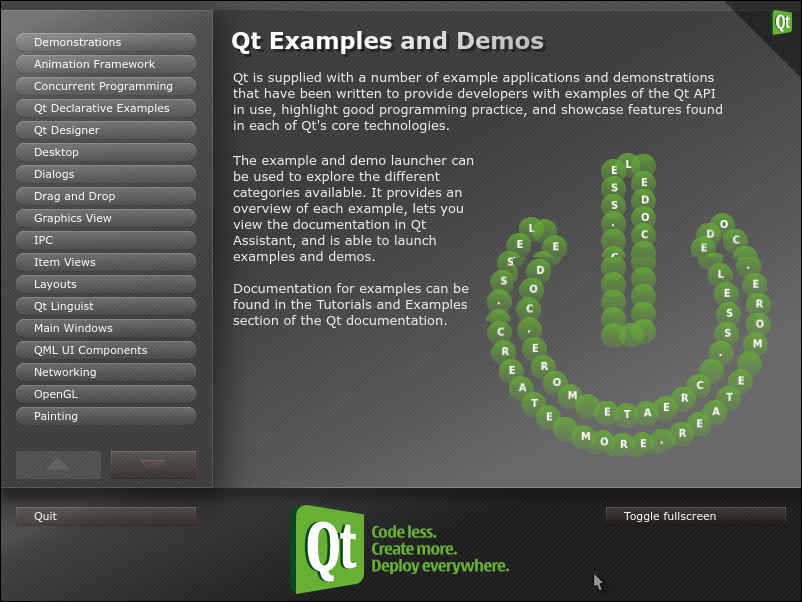
Now it's possible to follow the baby steps of:
How to Develop Qt Applications in the Oracle Developer Studio IDENOTE
Fortunately, you can also use NetBeans 8.2 hassle-free.
Version 8.1 doesn't integrate well, perhaps requiring some tricks...
Subscribe to:
Posts (Atom)